The State Of Top 100 List: Say Hello To New Blogs.

Since relaunching the list of real estate blogs las week, there were number of new blogs submitted. I will take time every week to introduce the blogs. This week we welcome ten new blogs to the list:

If you don’t see the blog on the list yet, it is most likely because I added your blog while the script was going through a scheduled update. The above mentioned blogs are now in the database and will be included in the list with the next update. Please follow GoBeyondMLS on Twitter to be notified about updates to the list.
Facebook Connect Solution For Your Blog

Ever since I saw the implementation of Facebook Connect on TechCrunch, I wanted to look into implementing it on my blogs as well. However since I was not very active on Facebook, I did not start digging into it until a few days ago. There are are number of solutions available for bloggers today should they decide to take advantage of Facebook Connect.

For now I have settled with the Facebook Connect WordPress plugin by Sociable. The Sociable plugin requires Facebook API so before you start using it, make sure to create new application in Facebook developer section of your account. You may also want to hack this plugin- see in the bottom of the post where described how I did it.

Once installed and configured the Facebook Connect plugin will allow your visitors to logging into your blog using their Facebook credentials. They choose to allow the Facebook Connect application (your blog), to post the comments they leave on your blog to their Facebook account as well.
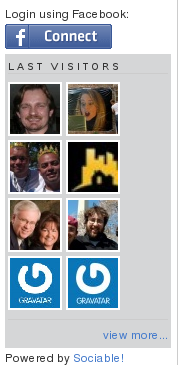
The Facebook Connect plugin by sociable has a widged that you can place in the sidebar of your blog where the visitors can login as Facebook users. Once logged in, they will also have an option to invite their friends to visit your website without actually leaving your blog.

Another unique feature the plugin provides is the community page, which is hosted right on your blog.

There is however one huge downside wit the plugin. It does not word that well with WP Super Cache plugin. Unless of course you can hack WP Super Cache plugin in such a way that it would serve dynamic pages to Facebook users once they’ve logged in on your blog. If you come across such a hack, please let me know.

Hacking the plugin to display the facebook login button somewhere around your comment box.– do this at your own risk.

Another shortcoming of the Facebook Connect plugin by Sociable is that the sidebar widget is the only place where the login button is displayed. Unfortunately the sidebar is not exactly the first place your visitors might examine when visiting your blog. They many leave a comment without realizing they could have shared it on Facebook. Placing the Facebook Connect login button in vicinity of the comment box can serve as a reminder that they could use their Facebook ID to comment on your blog. Unfortunately I had to come up with my own hack to accomplish that- copy and paste to code below into your comments.php file:

\n"; ?>

This is how my comment box looks now with the code above inserted:


It is probably my worst ever attempt to hack anything. Hopefully some one can come up with a better hack. With the above hack, after successful login, the page if refreshed on the very top. Bringing the visitor back down to the comment box would be so much better- but as I said, I suck at coding.

For the list of other Facebook Connect plugins and solutions for other blogging and content management platforms make sure to visit Facebook Connect Plugin Directory.

The List Of Real Estate Blogs Is Back

It has been just over a year since I first started to play with an idea of compiling a list of real estate blogs, and to sort them according to Alexa rank, Google PR and Technorati Rank. I have decided to revive the list and it is now live and well on Go Beyond MLS again, where it all started.
Why is the list back on this website?

Some of you may remember that I have dedicated a separate domain for the list (www.top100realestateblogs.com), which is no loger in my possession and you probably still can snatch it from Go Daddy if you so desire. Not sure what you can do with it though….

I have decided to abandon that domain simply because it is much easier to “pump some juice” into the list from this blog, as it is more recognizable, has more traffic and ranks much better than the other domain did. Truth has to be told that I did not promote www.top100realestateblogs.com with enough excitement and energy as this blog or my other blogs.

Either way I believe Go Beyond MLS is much better suited to be a home for the list of Top 100 Real Estate blogs.

Substantial Change- All Links Are SEO Friendly Now

One of the things I always wanted to accomplish with the list is that I want real estate bloggers to truly benefit from the list. To accomplish that instead of publishing the list via a javascript code, which was invisible to search engines, the list now published through a PHP code that in essence is plain old HTML. The list is now visible and indexable to search engines.

While only about top 20 blogs on the list will have some share of the traffic the list receives, I hope some juice along with page rank will be transfered to all the blogs on the list.

Is it just another link exchange farm?

Some may come to that conclusion while looking at the list. But since I do not ask for a link back to this blog in order to be featured on the list, it can hardly be viewed as link farm scheme. In fact it can serve as a good resource for advertisers looking to expend their brand into real estate blogging community.

How Often Is The List Updated?

At the very minimum, the list will be updated once a week, therefore if you just submitted an inclusion request your blog may not be yet on the list. Be sure to come back and visit the list a week from now.

Final Thought

If you ever come across this blog, I want you to know that it is never too late to submit your blog to be featured on the list. If you are a real estate agent but do not have your own blog, I hope the list will serve you as an encouragement. I am certain you can regonize at least few of the blogs on the list. There is also much we can learn by observing the blogs on the list. Some of them shine as great examples of blogging in real estate- more to come on the subject in the future. So stay tuned and happy blogging!

AddThis Improves Usability and Reporting

Back in October of 2008, I wrote a post in which I tried to compare two services that allow your readers to share the content of your blog on variety of social bookmarking websites- AddThis and ShareThis. At the time I was experimenting with both widgets across my blogs. While AddThis may have been a little more recognizable, I thought that ShareThis offered better reporting.

Over the last few weeks, AddThis managed to win my heart and today I would like to highlight few of the changes.

Button and The Way User May Interact With it

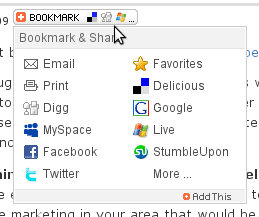
While I am still not that thrilled about button on “hover” behaviour- I would rather it to begin interaction on “click”. But considering AddThis popularity, I think it is safe to assume that majority of visitors expect AddThis button to behave a certain way. Besides there is a reason why AddThis button responds to both “on hover” and “on click”. When you however over the button with your moths a small widow is pulled down with several essential social bookmarking websites:
AddThis Button
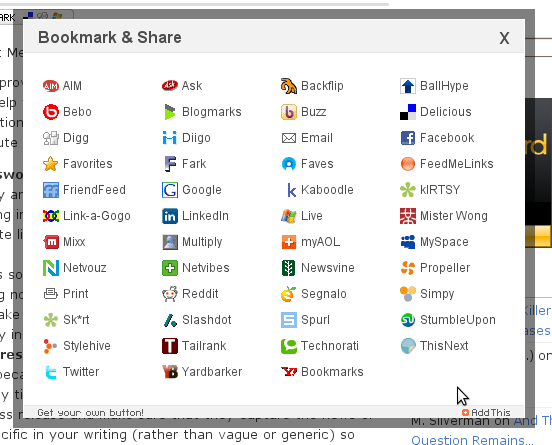
However if a visitor clicks on the button, a larger window pops up which allows you to choose between about 47 different social bookmarking websites:
AddThis Pop up
In the past when a visitor clicked the button, it would take him or her to a page on AddThis website.

Reporting and Statistics

Not sure it was me (highly unlikely) AddThis listened to, but they did heck of a job with improving the reporting and statistics. First thing you may notice logging into your account is that AddThis now segregates data for each domain. If you happened to have AddThis button on multiple websites, you are likely to find this feature useful.

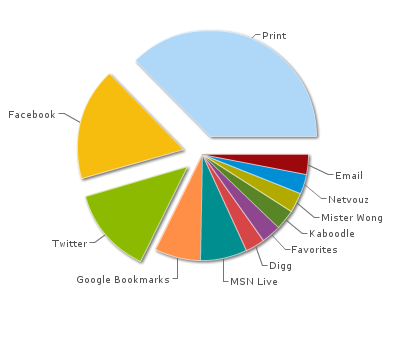
AddThis now also provides data on where your content is submitted to. You can find that under “Top Services”.
AddThis Top Services
In addition AddThis also provides information about geographical location of users sharing your content- look for it under “Top Continents”.
AddThis Top Continents

5 Tips for Killer Online Press Releases

This is a guest post by Janet Meiners Thaeler – Newspapergrl (online PR)

Have you ever thought of improving your online business with a press release? Press releases are great tools to help your web site rank higher in search engines. I’ve written press releases for national brand name real estate pros. Here are some tips to help you write and distribute your first press release:

  1. Find something newsworthy to write a press release about.
    Right now the economy and saving money are hot topics. You may be doing some creative marketing in your area that would be a great story. If you need inspiration, search a site like PRWeb for “real estate” and see what others are writing about.
    Remember that news is something that exists in time – something has happened, is happening now, or is happening in the future. Sometimes people get confused and mistake a press release for an advertisement (not objective) or an article (not timely information).
  2. Add quotes to your press release.
    Quotes are important because they say key points of the news “in your own words.”  This is the only time you can use “you” and “yours.” I like to use at least 2 quotes in a press release and make sure that they capture the news or an aspect of it. Be specific in your writing (rather than vague or generic) so that anyone reading the quote could know who you are, what the news is, and why it matters just from reading the quote.
  3. Use Links in your press release.
    Many people make the mistake of not using links in their press release. Online it’s vital to use links because links are the currency of the Internet. A link is a “vote” for your web site in search engines. Use about one link for every 100 words.
  4. Link to other pages besides your home page.
    It may be tempting to just add a link at the end of your press release that says something like: For more information, see  “www.yourwebsite.com.” So you only have one link and it’s just to the home page. Ideally you should link to related pages, articles, or blog posts. You should aim to use words as links, not just URLs. I usually add a link in the intro, throughout and then as the last sentence of the press release. S
  5. Distribute your press release online.
    Press release distribution sites like 24-7pressrelease.com will let you add text links for about $50. It’s worth the cost to use a service like this. For larger distribution I highly recommend PRWeb‘s $200 SEO visibility package. The submission process is a bit more involved but you’ll get traditional media and get the best online distribution on the Internet.

Hope these tips are helpful. I’m writing a book about online PR. Send me an email – janet [at] affiliateflash [dot] com and I’ll let you know when it’s finished and I’ll also notify you when I’m ready to give away a few copies on this blog.