Telling Google How Often To Crawl Your Website

If you are using Google Webmaster Tools you are probably aware that, among many things that these tools offer, there is the ability to submit your web site’s sitemap to help Google discover pages on your website. Google Webmasters Tools can also provide some insightful information about your website. Among many different statistics you will see the page containing information about about “crawl statistics”. You will find there a graphic of Googlebot’s activity on your website over the period of last 90 days. Just like the one you see below.
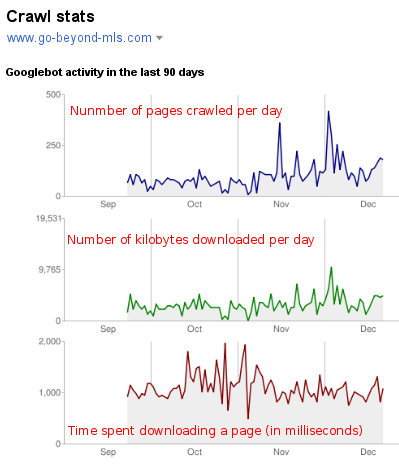
Go Byond MLS Crawl Stats

In the past Google did not offer webmasters many options or saying about how ofter they can or will crawl your website. While from time to time, after determining that your website may use a faster crawl rate, they would offer you an option to change this rate. However over the period last few months I was never offered that option in Google Webmaster Tools for my websites. So I have trusted Google, as most of us do, to crawl and discover the websites in their own time, and have completely forgotten about the “crawl rate” settings.

It appears, however, that recently, Google Webmaster Tools have opened the option to set a custom crawl rate for the websites you have listed in your account:
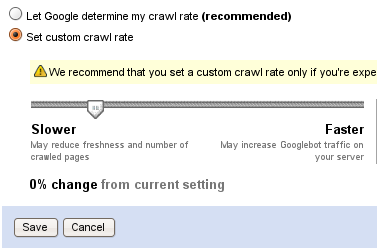
Custom Crawl Rate

SettingsThe above option can be found under the main settings in your Google Webmaster Tools account, and it is quiet self-explanatory. Stetting a “slower crawl rate” will reduce Googlebot’s visits to your website. I would recommend not to set a rate slower of what Google is already doing, unless your are experiencing issues with bandwidth. The slower crawl rate will probably result in delay with indexing your latest content. If anything, you may want to experiment with a “faster rate”, if you think it takes too long for your latest content to appear in Google’s index.

For time being I will not customize the crawl rate for this website, as I am pleased with what Google is doing now. I will however experiment with few other websites with intention to report here how can you benefit for this option, if you can benefit at all.
ePerks To File For Bankruptcy. But Things At LeapFish Are Peachy!

UPDATE May13, 2010: Things pertaining to LeapFish.com, their founders and management, along with related startups are no longer of interest to me, therefore no further comments are allowed on this post. There are also more reliable sources out there (such as Better Business Bureau) to help you make an informed decision about LeapFish.

***You may also want to know that the Law Firm of Daniel Bakondi, in San Francisco, CA, is investigating a possible Class Action Law Suit Against LeapFish.

If you are trying to get your money back after receiving no leads from advertising on ePerks, chances are you are out of luck. As one real estate agent learned, ePerks is to file for bankruptcy and is offering a 20% refund. If you are not happy with a 20% refund tough luck- you may get nothing after the bankruptcy goes through:

Yesterday, Michael with ePerks called me on my cell phone & said that eperks will be filing for bankruptcy & will not be refunding my money. I was floored. This is really upsetting to me. I cannot believe that a company that is STILL selling memberships would tell me that they will not keep their word. He said that I have 2 options- that I can walk away now with 20% of what they owe me “so that I get something” or I can agree to be pd out over the next yr, but if they file for bankruptcy then they owe me NOTHING. – read the entire article here.

The agent goes on blaming, of all things, government for not covering ePerks under the blanket of recent bailouts:

(Michael) told me that times are really tough for the company with the economy being like it is and unfortunately eperks didn’t get to be part of the government bail-out & doesn’t have the money to pay back all of the people that want their money back.

Well since we are using the recent events in the economy, why don’t we bring up Bernard Madoff as well. Why? Thea answer is LeapLish.com- a new search engine launched by the same group of people. if Unlike for Michael (the sales rep cited above)- things for LeapFish sales representatives look peachy. According to a recruitment ad on Craigslist, a sales rep can make $150,000 a year while working at LeapFish. I am not surprised at all that ePerks decided to fold down their shop, just about after about one month of unsuccessfully trying to get traction with the search engine and even having been humiliated on the world’s leading technology blog TechChrunch.

It has to be said that LeapFish.com and DotNexInc did their best to distance themselves from Brabus Ventures and ePerks. It appears that founders and sales people at LeapFish are infatuated with real estate agents- just take a look how much astroturfing has been done on ActiveRain.

I don’t know how the bankruptcy works. Never filed for one. Never plan to. If it works the way I think it works, it’s a great way to screw your clients. The hell with the clients, just file for bankruptcy start another business. Why shouldn’t life be peachy?

Dealing With Splogs: Make Them Link To You!

If you are a blogger, chances are that sooner or later you will come across a phenomena called “splogs”. These blogs republish your content without your permission and without giving your a proper credit for your work. Some times they do link back to you but dressing up your links in pink colors of “nofollow” attribute. So how do you deal with them?

I came across an interesting discussion on AgentGenius.com on how to deal with splogs. Tom Royce of Real Estate Bloggers suggested a plugin called RSS footer– this plugin allows you to ad an extra link into your feed with a custom message, which can be used to expose and embarrass the splogger.

There is also another similar solution to the above plugin. I have been using it for quiet sometime without realizing it has a potential to insert additional links each of your RSS feed item- Similar Posts Plugin. This plugin undergone husge transformation since I first began using it, if you have it on your blog an kept with plugin’s updates make sure to look at every set of settings to appreciate more what this plugin can do for your blog. You can specify the links to similar post in RSS feed under “Placement” option in the latests version of the plugin.

Since many of the splogs are automated, the extra links to your website will begin to show up on these splogs. There is one more benefit from using the above described plugin- but revealing it means giving away a simple solution to the “developers” of these splogs.

So to all of you who think splogs are fun I am begging you: please go ahead and scrape my blogs.

Note: Above plugins are for WordPress.org powered websites only.

Move To IntenseDebate Copmleted

IntenseDebateThe other day I wrote about moving moderation of comments to IntenseDebate. The move was completed successfully, you can now find both my profile and this blog’s profile page on IntenseDebate: Vlad Zablotskyy on IntenseDebate and Go Beyond MLS on IntenseDebate.

The move went smoothly and it took about 8-10 minutes for IntenseDebate to move 1200+ comments of this blog.

One of IntenseDebate plugin that caught my eye is that you can still use your WordPress’ native comments interface on your blog while allowing the plugin to sync the comments made on your blog to your blog’s profile on intensedebate.com. This can be useful if you would like to test their service without revealing it on your blog.

One downside that unlike Disqus, IntenseDebate does not offer any integration for video commenting. But this does not really affect this blog as I rarely make any videos myself.

I like the performance of IntenseDebate so far, let see what they have to offer in the future.

Go Beyond MLS Is Now Powered By Coltrane

Updating your blogging software may not be the most pleasant experience. I know that many WordPress users have been apprehensive upgrading their versions because some times the update can be quiet painful. My personal biggest concern before updating WordPress is always associated with plugins I have active on my blogs. I always hope that on the other side of the update somehow all my plugins continue to function. I have to say that since the time we are able to update plugins straight from our dashboards, not even once did I encounter problem with plugins when updating WordPress.

So Coltrane is here. I have been using the latest version for a few days now and have to say so far this is the most awe-inspiring version of WordPress I even seen. Take a look at the following video to fully appreciate whats in store for you as far as the latest WordPress version is concerned:


Needless to say that this Coltrane version is becoming most popular- 516,311 downloads as of writing this post.

So the first par of some changes on this blog has been accomplished- I have updated the blogging software. Now it’s time moving the comments to IntenseDebate.