Fizber Introduces API


Fizber announced today introduction of API (Application Programing Interface). Very smart use by Fizber I must add. If marketed properly this can explode in new widgets, just like the one you see to the right.

It would be interesting to see this development. At this early stage Fizber APIs will allow web masters to pull in the data about climate, schools, unemployment some other general neighborhood information.

Julia Foster, Fizber.com VP of marketing, in a low key press release was quoted say: “This new API access is going to be a useful tool for every agent and site that wants to offer something special in their real estate portfolio.”

I personally think many web masters should pay attention to this development. It also should be as warning sign to many of the local MLSs. Instead of fighting real estate agents over stupid trademark use, why don’t you guys pay attention and develop the API for your own members.

RealBird.com- Viral Marketing Widget For Real Estate Agents

When I came across RealBird Listing Widget on Wallingford Wired Blog, it immediately grabbed my attention. It is not a secrete that many real estate gents can be very protective of their listing. If you don’t believe me, read the blog post by Greg Swann about a listing that was not his own.

I can’t blame Realtors for being overprotective about their listings. You don’t want your inventory to be misrepresented. However, at the same time many real estate websites have their local Multiple Listing System integrated into their websites so when visitor searches for the property, he can browse through hundreds of listings without leaving the website. Of course this can result in a lead where you can work as a seller’s agent on a property that you did not list.

But what about offering an opportunity just to any webmaster to “advertise” for you for free? Going back to Wayne and Pat, below is an example of a listing served via Realird.com Listing Widget I was able to grab right from their blog:


Why would you consider RealBrid.com? Simple. Viral marketing. There are many bloggers like myself that are on the constant lookout for good content for their blog. This can create an exponential exposure for you listing.

Should You “Quantify” Your Website With Quancast?

It has been few months since this website was “quantified” on qunatcast.com. There are some interesting and surprising statistics about this blog. But first things first. What is Quantcast what does it mean to be quantified?

Quancast is an internet rating service. In other words they provide data about traffic to the websites. Currently they have over rated over 20 millions websites. They get their data? It’s done by estimates (please do not ask me how they do it) or by direct measurements. When you visit the Quantcast.com you will notice that the good number of websites are “quantified”. Those are the websites that are being measured directly. And yes I recommend you to quantify your site. It’s very simple to register, and all you need to do to quantify your website is to place a peace of code into the template of your website or blog, similar of what you do with the code from Google Analytics.

Since this blog is hardly known by any one, it took about two months for Quantcast to report demographic data of the visors to this website. This demographic data about visitors to this website was the main reason I ever registered with Qunatcast.

Here are just few snapshots.
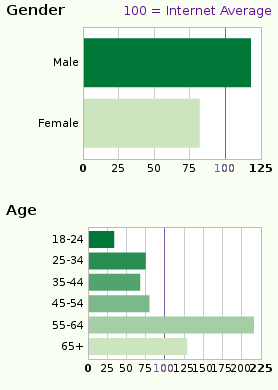
Gender and Age GraphGender and Age Of Go Beyond MLS Visitors
I thought that more women are visiting my blog. The real estate industry is dominated by women. Even when I was active in the real estate, out of 15 agents in our office there were only 5 men. Since real estate agents is my target audience I naturally thought that most of my visitors are women.

The age of the visitors completely surprised me. I belong in the 25-34 age group so I though my visitors would be of the same age. I turns out my site is more popular among 55-64 age group. This of course is very humbling to know that more experienced people find my blog interesting enough to visit.
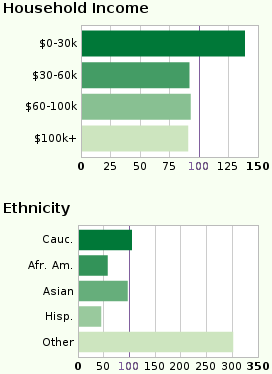
Household Income and Ethnicity GraphHousehold Income and Ethnicity of Go Beyond MLS Visitors

I had really no expectation about these statistics. Still don’t know if this knowledge will have any real effect on how I develop this blog. But there you go:

Education and Children of Go Beyond MLS Visitors

Again, had no expectations whatsoever about these statistics. I guess they can be useful as far as advertising is concerned. But since the demand for advertising on my website is minimal, I will just look at it and say: “Hmm, interesting”.
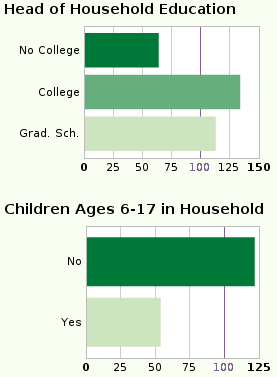
Education and Children GraphSo why would you want to know this sort of data about you website? I think above data can be extremely useful if you are trying to target a specific audience.

Quantcast provides some great reports on geographic location of your visitors. You can see where do your visitors come from by country, state and city. This of course can very useful for the real estate websites.

How reliable is Quancast data? I would say that the data on “qualified” websites, or directly measured websites, is right on target. But why should you believe me, try it for yourself. 😉

You can see the entire report for my website here. If you care to share similar statistics about your blog or website, feel tree to leave a link the the comments.

Google Custom Search Insted Of Default Search Function on WordPress?

Google Custom SearchI have decided to play around with Google Custom Search. Now you can find pages and documents on this domain using the big “G”. Since this website is powered by WordPress, many who read this post will wonder why? Do I trust Google more? The answer to this question is yeas and no. Mos of the WordPress themes today include a “search box”. This default search in WordPress will serve your visitors the most up to date results, since there maybe some latest posts on our website that Google has not yet discovered. So why on earth would some one consider using Google?

There few reasons to consider.

It may help you to avoid duplicate content. Unfortunately some of the WordPress themes are written poorly. Some times it can happen that what suppose to a “search” results can be indexed in the search engines. In fact, there is no way for a search engine to tell a regular page apart from a page produced by your on site “search function”. I am not sure if this is a common problem but it does happen.

If you have several similar websites, you can tell Google Custom Search to serve results from the all of your websites. You can even include websites that do not belong to you, but you think that your visitors would benefit from the results.

You can refine the results so your visitors after performing a search will be served with the most relevant search results.

I also think that the “native” search option of WordPress is underutilized. When you place the Google Custom Search code on your website, the text box has Google’s logo in it. Don’t forget that word google had become a verb, it is associated with search. Don’t tell me you have never said: “Let me Google this or that out”!

Many of the visitors to your website will recognize Google’s loge before recognizing anything else on your website.

I personally have chosen to serve the search results via an AJAX Search API interface, I just thought it looked really sharp. So go ahead try my new search box and let me know what do you think.

Disqus: You Must Take A Closer Look !

Comments are the reason why blogging is fun! Moderation of comments, what makes blogging a burden. Especially if you are faced with sporadic or even systematic spam monkey attacks.

I love comments and try to answer to majority of comments across my blogs. This along can be come very time consuming. I host my three most active blogs on three different web hosting providers, on good days I spend up to an hour answering comments. But it has been becoming somewhat difficult task. Until of course you would use Disqus. With this new system an ordinary hour of answering to comments on my blog effectively turns into mere 10 minutes.

I was a little hesitant at first to even try Disqus. In fact the first few times I saw Disqus installed on other blogs, I refused to leave comments. However, after Scott Jangro, a software engineer, had taken Disqus for whirl, I new I had to give it a try as well.

Now I am absolutely in love with this new way of managing comments on my blogs. There are two things that absolutely love about Disqus: 1) You can manage the comments for all your blogs in one place; 2) It allows you to answer to the comments via e-mail- huge time saver!

If you have not try Disqus yet, give it w whirl. Good products like this tend to become huge. I predict Disqus to be bigger that MyBlogLog and BlogCatalog.

If you join Disqus, make sure to look me up:

Make sure to come back and share your Disqus details with me so we can connect.