Over the period of last few years bloggers had found creative ways to allow their readers to easy share the content of the blog on social bookmarking websites. WordPress has several plugins allowing you to implement easy sharing of your content. Probably the most known plugin is Sociable– a plugin I often used on many of my WordPress powered websites. One of the things that I always wanted to see in Sociable plugin was the ability to report how many times and on which websites my content was shared. If they consider developing such reporting, I may use the Sociable plugin again. However for now I had to say goodbye to Sociable and for the past few weeks I was taking a closer look at AddThis and ShareThis.
AddThis
 I came across AddThis before I discovered ShareThis. AddThis allows you to add a button to your website by inserting a piece of code into your website or, if you are using WordPress, you can try their plugin. One o the downsides of using the plugin is that it inserts the button below the post and is not offering flexibility to place the button anywhere you want.
Issues With AddThis “Dropdown” Button

One thing that I find annoying about “dropdown” version of the AddThis button is that behaves “unexpectedly” (example on the left). I belong to the “mindset” that if you just hover over the button with the cursor it should not talk, sing, smile, wink or otherwise interact with me. Unless, of course, I click on it!
AddThis Reporting And Related Issues
One of the things you may quickly discover that in order not to mess up your AddThis statistics. You may need to open several accounts if you would like to separate the statistics for each website.
I would love AddThis develop and offer more in depth reporting. In particular I would like to see them reporting not only how many times a particular URL was shared, but to tell me exactly on which of the social websites it was shared.
ShareThis

As you can see I have chosen ShareThis for this blog. Although I have not made the final decisions which services I will end up using, there are few things I like more about ShareThis. (UPDATE: After trying both AddThis and ShareThis I have opted to use AddThis on most of my blogs)
ShareThis Allows You To Track Multiple Domains
In your ShareThis account you can ad more than one URL. ShareThis provides separate statistics for each domain. It takes abotu 24 hours for your statistics to be shown from the time you add a domain and install the code or the WordPress plugin on your blog.
ShowThis Has More Detailed Statistics
While still short of reporting exactly which URL was submitted to what social networking websites, ShareThis offers some extra statistics that I find interesting and useful.
ShareThis Button Can Be Placed Anywhere
If you decide to use ShareThis on your wordpress, it is quite flexible as to where you can place the button on your blog. By default it places the button at the end of the article, but you can override that option or place an additional button in the beginning of your posts.
ShareThis Offers More “Sharing Options”
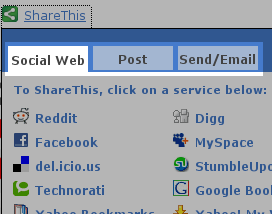 Besides offering your readers to share your blog’s content on top social bookmarking websites, SharThis offers other blogger to “reblog” your content. It also offers and opportunity to your visitors to share your blog’s content via e-mail, SMS or Instant Messaging.
Conclusion
I think both services can improve reporting. While certain submissions (such as when your pages are submitted to StumbleUpon or Digg) can be noticed rather easily, allowing you to interact with the submitter. Improving this side of the reporting will allow yet another way for the owner of the blog to network with his or her readers.
Final thought for the blog owners. If you have not tried either of the services, make sure to try at least one of them. The implementation is very easy, both have WordPress plugin. It will take you less than 15 minutes to implement the plugins, but you can rep the benefits for years to come. One thing you have to remember that no plugin in the world can substitute your interaction with your readers and your fans.