I often wonder what is worse? Having a server down time or having your blog hacked by a spammer? I would prefer a server down time over having my blog(s) hacked by spammers any time of night or day.
Recently I have been helping a friend of mine after her blog was hacked by a viagra spammer. I am sure some of my readers can benefit from the things I have learned.
How Do You Know If Your Blog Is Hacked?
It can take days or weeks before you can discover that your blog was compromised. But following are red flags you should pay attention to:
- Your blog’s performance suddenly decreases. It takes forever for pages to load in your browser. It can be due to the fact that a PHP scripted inserted in your blog’s theme files is trying to “pull in” hundreds and even thousands of slinks. Your blogg may appear to you and your visitors the same, but if you take a closer look at the source of your pages you might see the link spam.
- The number of regular daily visitors suddenly drops. This can be due to two factors:
- Visitors become impatient that your pages take so long to load and move on.
- Your search engines raking and position may be affected resulting in less
traffic.
- If you are regularly using an FTP client, pay attention if there are any suspicious files on your server.
Things you can do to help you out to make you blog less attractive to “viagra spamers and hackers”.
- Always have the latest version of WordPress. Yes updating WordPress in the past was rather painful task. But there is no longer excuse not to update it your software since you can do it straight from your Dashboard.
- If you still are afraid to upgrade your WordPress on thing you can do is to stop publicizing to the entire world which version you are actually using. Many theme developers please a code in the header of your blog that produces following result:
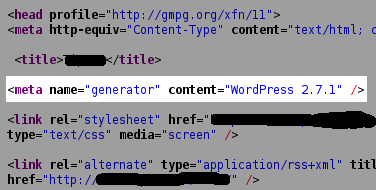
You can fix this rather easy by removing following code from the header.php file of your current theme:In my opinion, it would be better to show your love and appreciation for WordPress by linking to them.
- One of the ways you can find out your blog has been hacked is to set up a Google Alert for the following query “viagra site:www.yoursite.com”. Of course you can substitute keyword “viagra” with any other keyword you think your site might be targeted with.
It is probably impossible to prevent your blog from being hack at certain point, but there are few things you can do to make your blog less attractive to spammers and hackers.
If you need more advanced approach to dealing with spam hackers, I highly recommend to read “New WordPress Hacking Strategy Using Cloaking to Target Google IP Addresses” by Aaron Wall
Thanks for the info. I had one of my sites just go through this and I think I finally got it fix. It is much better to prevent than try to recover and rebuild.
One of the things I should have mentioned is to created a backup of your sites and MySQL databases on a weekly basis. Thanks for stopping by Elliot!
I build WordPress Websites for a living. Thanks for the heads up! While I haven’t had a site compromised yet – I certainly get slammed in all my emails… I am off to update 2 older WordPress sites to the current WordPress 2.9.
Trying to diagnose this myself, I found that you can “Fetch as Googlebot” in Google’s webmaster tools.
Dave, just look up the source and search for suspected kewyords. However once you are already in your webmasters tools look there is an option for “malware”.
I’m just wondering is there a jargon free way of getting rid of this crap in the meta part of a blog?
I have one link for viagra and one for cialis and I’d like to be able to just delete them and get on with my life.
The people promoting this rubbish must have some issues with thier own masculinity….
Michael,
I would suggest to look and see if you can find the links in your template file header.php (I am presuming you are using WordPress) to see if the link was injected there.
Would you mind if I e-mailed you to the e-mail address you left when commenting?
Hmm is anyone else encountering problems with the images on this blog loading? I’m trying to determine if its a problem on my end or if it’s the blog. Any responses would be greatly appreciated.