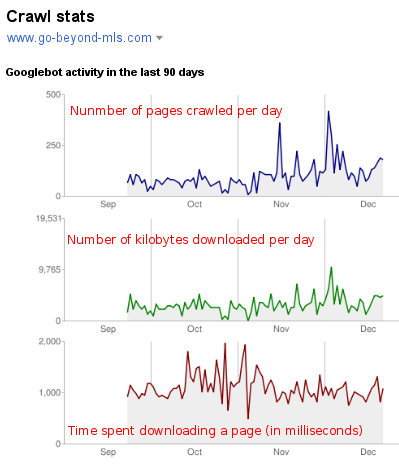
If you are using Google Webmaster Tools you are probably aware that, among many things that these tools offer, there is the ability to submit your web site’s sitemap to help Google discover pages on your website. Google Webmasters Tools can also provide some insightful information about your website. Among many different statistics you will see the page containing information about about “crawl statistics”. You will find there a graphic of Googlebot’s activity on your website over the period of last 90 days. Just like the one you see below.
In the past Google did not offer webmasters many options or saying about how ofter they can or will crawl your website. While from time to time, after determining that your website may use a faster crawl rate, they would offer you an option to change this rate. However over the period last few months I was never offered that option in Google Webmaster Tools for my websites. So I have trusted Google, as most of us do, to crawl and discover the websites in their own time, and have completely forgotten about the “crawl rate” settings.
It appears, however, that recently, Google Webmaster Tools have opened the option to set a custom crawl rate for the websites you have listed in your account:
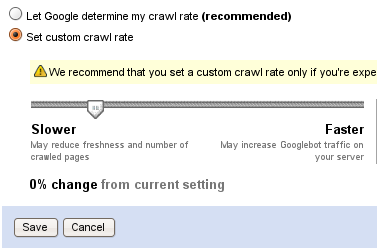
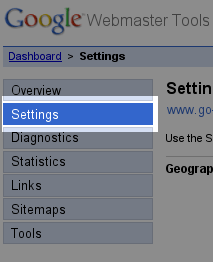 The above option can be found under the main settings in your Google Webmaster Tools account, and it is quiet self-explanatory. Stetting a “slower crawl rate” will reduce Googlebot’s visits to your website. I would recommend not to set a rate slower of what Google is already doing, unless your are experiencing issues with bandwidth. The slower crawl rate will probably result in delay with indexing your latest content. If anything, you may want to experiment with a “faster rate”, if you think it takes too long for your latest content to appear in Google’s index.
For time being I will not customize the crawl rate for this website, as I am pleased with what Google is doing now. I will however experiment with few other websites with intention to report here how can you benefit for this option, if you can benefit at all.
It's a nice option to enhance your page listings and update frequencies in Google but one thing I don't like about it is that it affects all the sites on my account. As i saw I can't modify them for individual sites.
Acmeous (Sorry for not knowing your real name),
You can modify these settings on site per site basis. To be honest I was very tempted to mark this comment as spam as I did with many of your comments across my blogs. I really thing you should reconsider your tactic as far as commenting on other blogs goes.
Best of luck!
I don't know what makes you think like that. But if you think so, then it may be so, but I am a genuine human and also not commenting abruptly.
Actually the case happened like that I had previously modified the rate of indexing. Then 2 weeks ago i added a new blog to my Webmasters account and there I saw that it has already taken the same speed configured for the others. It even not changeable now. It may have a time period of a month or so before I can modify that. That's why I said this.
And Sorry if I had spammed up your blogs. Will surely reconsider.
And Acmeous is my name, you search for it on Google and see what you get about me.
Sorry,
I think I have completely confused you with some one else. An individual with the same name was linking from my blogs to a page with acme treatment products. So I was surprised the a comment was left and it actually made sense considering the subject- hence my reply to your original message.
I apologize, I should have checked your blog before answering.
Its Ok Vlad,
It happens. It's the same pain that every blogger has to bear with and also happens to me.
Thanks for visiting my blog.
Loved your blog and your posts. 🙂
Thanks for this nice post. I haven’t try this one. I design so many website and I can also do optimization. I think if you do proper optimization with title tag to images and heading tag and give proper names to files, adding meta tags to every page, design good Site map etc…. means follow every step that is essential for optimization, Google will automatically crawl your website. It can happens so many time.
Since I ready your blog I think I might also try this one.
After reading this post I have today adjusted my crawl rate and i will be very interested to see how it goes over the next 90 days to see if it has made any difference or not