If you write a blog, it is safe to presume that you want other people to read it. Unless of course you have blocked the search engines and are allowing only certain people to see your blog. From what I can gather when it comes to the real estate blogs, most of us would like our blogs to be read. In fact some of us have set a goal to turn first time visitor to our blogs into regular one or even a subscriber. In fact in some other niches, the value and the influence of a blog is determined by the number of subscribers.
In real estate, blog can also be responsible for the growth of your business. In fact, many real estate blogs are highly monetized digital “properties” on the internet, while others contribute to the successful real estate transactions outside of the Internet. In either case the subscribers to your blog may have something to do with the dollars in your pocket at the end of the day.
In this tutorial, I will show you one way you can track a specific goal (lets call it “subscriber goal” for the sake of the argument) using Google Analytics. If you are not familiar with Google Analytics but are serious about your online marketing efforts I strongly suggest opening an account. Learn as much as you can about what Google Analytics has to offer, it will only benefit you in the long run.
Before I get into technical part, which will require some minimal knowledge of HTML, I would like you to sit down a determine following. Think about the past month. How much income (preferably net income) can you contribute directly to your blog? Now divide that amount by the number of subscribers- the result will be used in Google Analytics as “goal value”. For example if your net income was $1000 and your blog has 265 subscribers, dividing $1000 by 265 will give you $3.77- when setting your gaol at Google Analytics you will use this amount to indicate your “subscriber goal”.
Setting The (Subscriber) Goal In Google Analytics.
If do not have an account with Google Analytics, you might want to register first and implement the tracking codes in the template of your website.
In order to track your subscriber you need to know who many people had actually clicked the subscription button or link. However, I highly discourage against placing Google Analytics tracking code int the feed of your blog. Also, if you are directing your visitors to your blogs feed at FeedBurner, you may not be able to implement the tracking code even if you advanced in programing.
In order to capture these statistics you will need to implement what is known as a jump page. You can do that by using a simple text editor such ad Notepad. Create a file a name in subscribe.html. Then copy and paste the code below, but make sure to replace few lines of that code with your own info (explained below the code):
<--REPLACE THIS LINE WITH YOUR GOOGLE ANALYTICS CODE HERE-->
Make sure to replace YOURFEEDSURL with actual URL of your blog’s feed and the line that says to replace it with Google Analytics Code.
Upload the file (subscribe.html) into the root directory of your blog. The meta refresh in the “head” of this HTML file will redirect users to your blog’s feed wile Google Analytics will capture necessary data.
Login into your Google Analytics account. In the dashboard area you will see the list of your websites in the table called “Website Profiles”. Then click “Edit” link for the blog you are about to implement a “conversion goal”. You can set up up to 4 different goal for each website. If you followed my instructions in creating the jump page and uploading it to your server, your conversion gaol configuration should look like this:
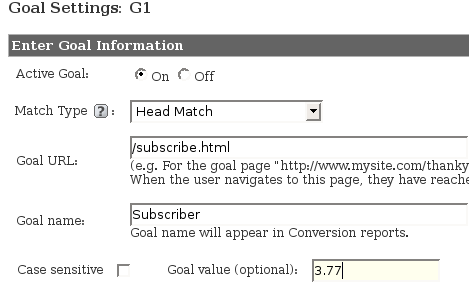
Note that 3.77 is the result of calculation we did dividing your net income by the number of your existing subscribers.
I know that it sounds some what complicated. But it is not as hard as it looks and the benefit of having these statistics measured should supersede any fear of tackling Google Analytics and a little bit of HTML coding.
Depending on the popularity and traffic to your blog you can see results within day or two. However to have more accurate statistics, you might need to wait longer than just one day.
Here is an example of how this is working for my website:
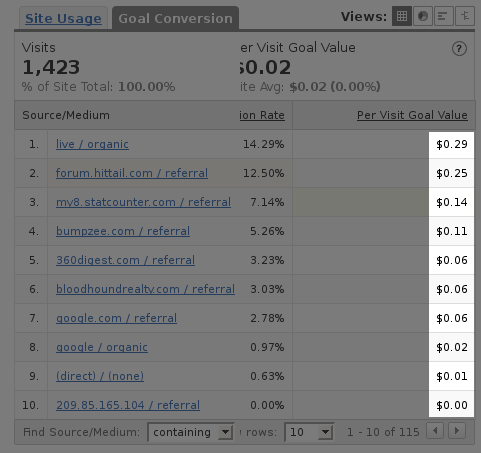
The figures in “Per Visit Goal Value” column offer me clear idea how much I can pay per each visitor and still profit if I were to strike advertising deals with the referring websites and blogs.
Warning: The above describe method should only be used in conjunction with other statistics. It maybe that some visitors may not actually subscribe eve after clicking the subscription button or link. You will also need to factor in unsubscribe rate and never ever use the gross income in calculating the goal value. Being very conservative when assigning the goal value will shorten the range of the error margin. You should also be conservative with your subscribers numbers, it’s better to err on the side of lower number of subscribers.