Over the period of last few years bloggers had found creative ways to allow their readers to easy share the content of the blog on social bookmarking websites. WordPress has several plugins allowing you to implement easy sharing of your content. Probably the most known plugin is Sociable– a plugin I often used on many of my WordPress powered websites. One of the things that I always wanted to see in Sociable plugin was the ability to report how many times and on which websites my content was shared. If they consider developing such reporting, I may use the Sociable plugin again. However for now I had to say goodbye to Sociable and for the past few weeks I was taking a closer look at AddThis and ShareThis.
AddThis
 I came across AddThis before I discovered ShareThis. AddThis allows you to add a button to your website by inserting a piece of code into your website or, if you are using WordPress, you can try their plugin. One o the downsides of using the plugin is that it inserts the button below the post and is not offering flexibility to place the button anywhere you want.
Issues With AddThis “Dropdown” Button

One thing that I find annoying about “dropdown” version of the AddThis button is that behaves “unexpectedly” (example on the left). I belong to the “mindset” that if you just hover over the button with the cursor it should not talk, sing, smile, wink or otherwise interact with me. Unless, of course, I click on it!
AddThis Reporting And Related Issues
One of the things you may quickly discover that in order not to mess up your AddThis statistics. You may need to open several accounts if you would like to separate the statistics for each website.
I would love AddThis develop and offer more in depth reporting. In particular I would like to see them reporting not only how many times a particular URL was shared, but to tell me exactly on which of the social websites it was shared.
ShareThis

As you can see I have chosen ShareThis for this blog. Although I have not made the final decisions which services I will end up using, there are few things I like more about ShareThis. (UPDATE: After trying both AddThis and ShareThis I have opted to use AddThis on most of my blogs)
ShareThis Allows You To Track Multiple Domains
In your ShareThis account you can ad more than one URL. ShareThis provides separate statistics for each domain. It takes abotu 24 hours for your statistics to be shown from the time you add a domain and install the code or the WordPress plugin on your blog.
ShowThis Has More Detailed Statistics
While still short of reporting exactly which URL was submitted to what social networking websites, ShareThis offers some extra statistics that I find interesting and useful.
ShareThis Button Can Be Placed Anywhere
If you decide to use ShareThis on your wordpress, it is quite flexible as to where you can place the button on your blog. By default it places the button at the end of the article, but you can override that option or place an additional button in the beginning of your posts.
ShareThis Offers More “Sharing Options”
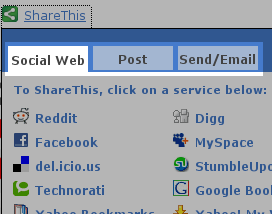 Besides offering your readers to share your blog’s content on top social bookmarking websites, SharThis offers other blogger to “reblog” your content. It also offers and opportunity to your visitors to share your blog’s content via e-mail, SMS or Instant Messaging.
Conclusion
I think both services can improve reporting. While certain submissions (such as when your pages are submitted to StumbleUpon or Digg) can be noticed rather easily, allowing you to interact with the submitter. Improving this side of the reporting will allow yet another way for the owner of the blog to network with his or her readers.
Final thought for the blog owners. If you have not tried either of the services, make sure to try at least one of them. The implementation is very easy, both have WordPress plugin. It will take you less than 15 minutes to implement the plugins, but you can rep the benefits for years to come. One thing you have to remember that no plugin in the world can substitute your interaction with your readers and your fans.
Thanks for using ShareThis!
You should also check out Joost DeValk's Sociable widget. I ditched both of the above many months ago after trying Sociable. http://yoast.com/wordpress/sociable/
Tim,
My absolute pleasure. I hope you consider my suggestion about extra in depth statistics.
I am a big fan of Sociable plugin…. just taking a look around to see what is out there.
Have you seen this one yet: http://www.addtoany.com/ ?
Brian, nice to see you around this blog again. I am truly humbled. Hope you are doing well.
I stumbled upon this post 😉
Add to Any looks pretty cool, too. Doing ok, still learning aff marketing and working on a couple campaigns while I wait for some money to come in and invest in PPC.
Hey Vlad, my name is Justin. I'm the Community Manager at Clearspring (the parent company of AddThis). I really appreciate your feedback about AddThis. It's something I'm going to take back to our team and make sure that they start improving. If you have any other feedback, feel free to drop me an e-mail – justin@clearspring.com Cheers!!
Hi Justin,
Thanks for stopping by. I just would like to maybe clarify few points:
1) When I opened my account with AddThis.com, I have installed the widget on several of my blogs. Being such a nerd as far as stats goes, I don't like the idea that all the stats are pulled into one account and are not separated. I like to compare how one website is being bookmarked vs another and maybe see some trends and make certain adjustments.
2) If some one submits my page to Digg or StumbleUpon I would like to make connection with that person. I have ways to struck these submissions however, if they use AddThis button to make the submissions, there might be a way to have more detailed reports.
3) In your WordPress plugin- offer an option to override the default position of the button.
Thanks for stopping by. I have not abandoned AddThis completely yet- using it on two of my other blogs 🙂
Vlad,
Do you get much response to either of these? I use, Share This, and I don't think I have gotten any value from it. The problem is people have to notice the widget, have a clue what it is, be motivated enough to click it and they must be a member of the social networking sites to submit it.
That really narrows i down and unless you have a lot of traffic i can't see it adding much value.
Thanks for the comparision and bringing out the differences. Have you any thought or did any comparison with the two mentioned with addtoany.com? I'm trying to decide which one so far is the “best” to use.
I think it in other way. I also know that if my site is bookmarked in at least 20 websites, then also it’s great for me. So the huge list of anyone matters less. But what matters to me is that which one is more usable and more noticeable. If users are not able to notice the bookmark button, then I have no benefit of using anything there. In this case i see that the AddThis widget is more noticeable and useful than that small green button of ShareThis. Secondly the Addthis widget works on mouse-over which is more attractive. The ShareThis widget again needs to be closed by clicking the close button.
That’s why I personally prefer Addthis.
hello, i'm the creative director for addthis. great comparison. i probably can't respond to every post, but i wanted to just mention that the reason why the addthis button opens on mouse hover is because it increases sharing/bookmarking activity. though this seems to be undesired behavior, in terms of user experience, we have the data to show that it increase sharing by at least 3-4 versus on-click.
if you want to increase bookmarking and sharing on your site, addthis will be a more effective solution. in order to respect the user as much as possible, we have put a great deal of effort into researching the optimal size of the menu.
we've made some large strides in terms of analytics, design customization, and performance enhancements to our button/menu.
hello, i'm the creative director for addthis. great comparison. i probably can't respond to every post, but i wanted to just mention that the reason why the addthis button opens on mouse hover is because it increases sharing/bookmarking activity. though this seems to be undesired behavior, in terms of user experience, we have the data to show that it increase sharing by at least 3-4 versus on-click.
if you want to increase bookmarking and sharing on your site, addthis will be a more effective solution. in order to respect the user as much as possible, we have put a great deal of effort into researching the optimal size of the menu.
we've made some large strides in terms of analytics, design customization, and performance enhancements to our button/menu.
Jeff,
Thanks for stopping by. It has been a while since I wrote this post. After comparing other widget to AddThis, I can say it offers best results. So much so that I am switching all my blogs and websites to AddThis.
The only one thing that I would love to see AddThis do is to allow webmasters to segregate statistics for each website, if you manage more than just one website. Something like ShareThis does.
Again, thanks for stopping by!
Jeff,
Thanks for stopping by. It has been a while since I wrote this post. After comparing other widget to AddThis, I can say it offers best results. So much so that I am switching all my blogs and websites to AddThis.
The only one thing that I would love to see AddThis do is to allow webmasters to segregate statistics for each website, if you manage more than just one website. Something like ShareThis does.
Again, thanks for stopping by!
That's great news. I've shared this page and the comments with my team, and we've found the comparison feedback to be very helpful. We're making some enhancements… so you should see some new enhancements soon—with the features you've mentioned.
Jeff it has been a while since I logged into my account at Addthis… The changes you have made are great! I will probably write a follow up. Great job!
Hi Vlad, I'm the UE lead here at AddThis, working with Jeff- just wanted to mention that we added domain filtering to analytics, with lots more to come — stay tuned.
Yes Jim,
I noticed that. It was tipping point for me to abandon ShareThis. Look forward to new features. Thanks for stopping by!
That's great news. We're happy to hear you've made the switch. We've got slot of new things brewing. Thanks for the positive feedback. Jim and I will share your comments with our team! Thanks!
Hey Thanks for the info, I found it very useful. I look forward to reading more.
Yeah I am using http://www.crowdsend.com on my site! Much better!
Looks interesting Tom. Will check it out.
You have a pretty embarrassing typo. You called “Sharethis” “Showthis” twice. No worries!
Thanks Michael… Will be corrected.