I do. But I have not always been a huge fan Google Webmasters Tools. Yes I had a paranoia of “keeping things secret” from Google. However, lately I am not only rediscovering some useful things the tolls have to offer. I think I am becoming a fan.
One of the reasons for any webmaster to consider using Google Webmaster tools that it allows to submit sitemaps of your websites or blogs to “help” Google to discover the pages on your websites. Yes, it is not guaranteed that your pages will necessarily be indexed by Google, but when they are these tools can provide some very useful information.
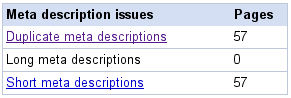 For example today I have noticed that there are 57 pages on this blog that have “duplicate” meta descriptions. While I can not be certain how much effect this actually has on how well my blog ranks in the search results. I am assuming there may be some sort of penalty associated with those “dupes”.
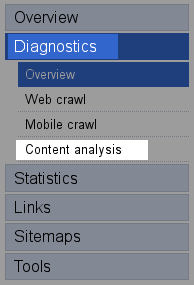 It is very easy to find out if Google has issues with duplicate meta tags on your website. All you need is to log into your account and click on “Diagnostic” menu and then on “Content Analysis”. If Google has nothing to report under that menu I guess you can consider it a good news. In may case as shown in one of the screen shots above I have an issue with at leas 57 pages containing meta tags that similar or straight duplicate from other pages. If you are running a WordPress blog and an plugin that automates the process of creating metatags you may run into a similar problem. What is the solution? First you can probably block Google bot via robots.txt from indexing the duplicates, but I would not recommend doing so. Chances are those duplicate are result of category or archive pages on your website.
Many in SEO community think that meta tags do not offer benefits as far as Google is concerned. I have chosen to disable the plugin that is responsible for generating meta tags. If anything, I would rather suffer a duplicate content penalties based on the content of the pages rather than on meta tags.
The bottom line is that there are many benefits from using Google Webmasters Tools, and if you have not done it before give the a try now. If your platform is WordPress I highly recommend Google XML Sitemaps Generator for WordPress– this plugin creates sitemaps for your blog that you can not only through Google Webmasters Tools but also through a similar services in Yahoo! and MSN.
Vlad,
As a quick rule of thumb about Meta Descriptions, they aren't important for rankings, but they do show up in the “snippet”. The Snippet is the sentence or two of information about your website in the search engine results page.
when a search is performed, the results show the page title as the blue link to your website, and then the snippet of content underneath. This is why it is very important to have a unique page title and a unique meta description for every page of your website – Duplicate content is another issue entirely.
There are some WP plug-ins that can automate this process, but I recommend editing these page elements by hand. I hope this helps!
Hi Matt thanks for stopping by. I appreciate your advise. 😉
They are not important for search, absolutely agree. However as far as Google figuring out what is duplicate and what is not matters, and Google evidently isn't looking only at the content to determine which page is a “dupe”. 😉
The best way is not to use any of those plugins…. I stopped using meta description and meta keywords about two years ago on my other blogs. Never got to it here on this one.
It pays to be a stupid bear. My report for says “We didn't detect any content issues with your site…” and is void of any entries.
lol Bart, welcome to my blog!
I think the issue was with the “metatag plugin” I am using on this blog. Since I disabled it, I am down to 23 duplicate metatags. It's hard to tell if it was affecting my rankings and traffic. But I turned in off anyway. The description and keyword metatags are history as far as I am concerned.
Vlad,
I use the the Google XML sitemaps generator but Webmaster tools says I don't have a site map. This despite the fact that the plugin says google found the sitemap. I haven't had time to figure it out yet. Google seems to find my site OK.
One thing I like in webmaster tools is the links feature. It shows ALL the links that google knows about. Being a non techie guy, that is a simple enough metric that I can understand.
Ned,
Th Google sitemaps generator for WordPress pings Google when you “manually” rebuild the stiemap. You will need to tell Google from the Webmasters Tools the location of the sitepamps. In case you don't know here is the location of your sitemap file:
http://baltimorerealestateinvestingblog.com/sit…
I really dont rely on it. I think in the end what matters is what content you have.
I'm also paranoid about Google hurting me bad!
actually i wanted to know whats web master tools..
can some explain what it is..
thanks a lot..!!
I have never used google sitemap, I will try it. Thanks for the article.
I too have never use Google sitemap, so I need to know more about them. Thanks for sharing this.